
Pixverse
Supports both text-generated video and image-generated video
Tags:Ai visual generationAI effects PixVerse AI pricing user feedback video creation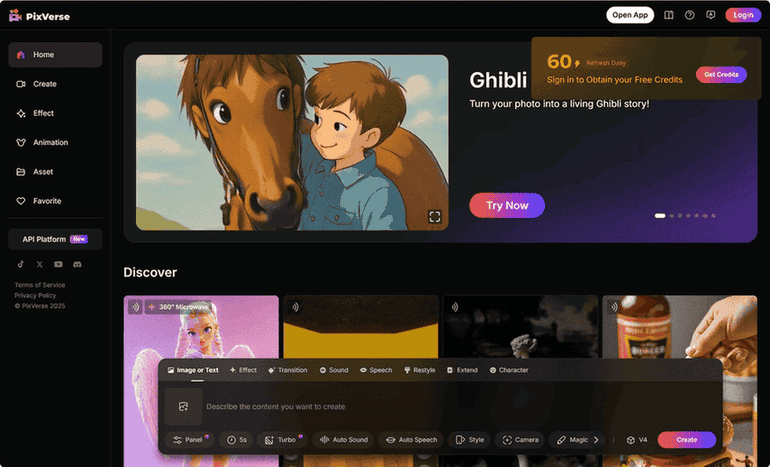
PixVerse AI: Crafting Captivating Videos with Artificial Intelligence
The digital landscape is constantly evolving, with video content reigning supreme in capturing attention and conveying messages. PixVerse emerges as a compelling artificial intelligence tool designed to empower users to effortlessly create stunning videos. With its promise to transform photos, text, and existing videos into extraordinary content, PixVerse positions itself at the forefront of accessible AI-driven video generation, opening up new avenues for creative expression and visual storytelling. The tool’s tagline, “Create breath-taking videos with PixVerse AI,” immediately suggests a focus on delivering high-quality, visually impressive results, catering to individuals and businesses seeking to elevate their video content.
At the heart of PixVerse lies a suite of intuitive features that cater to a wide range of creative needs. Among its core functionalities are three prominent creation modes. The “Text to Video” feature allows users to translate their written ideas directly into dynamic visual narratives by simply typing a prompt. This capability significantly lowers the barrier to video creation, enabling individuals without any pre-existing visual assets to bring their concepts to life. The ability to transform textual ideas into engaging video content opens up numerous possibilities for storytelling, marketing campaigns, and general creative expression. For those with existing visual content, the “Image to Video” feature provides the power to animate static images, adding motion and dynamism to otherwise still moments. This offers a unique way to repurpose and enhance photo libraries, transforming them into engaging and shareable videos. Furthermore, the “Video Extension” feature addresses the need for longer video content by allowing users to upload an existing video and have the AI seamlessly extend its duration. This suggests a sophisticated understanding of video context, enabling the AI to generate plausible additional frames that maintain the continuity and style of the original footage. The consistent presence of these three core features across various descriptions of PixVerse underscores their fundamental role in the platform’s functionality and user experience. The straightforward descriptions, such as the claim that no editing skills are required and that high-quality animated videos can be generated from still photos within minutes, highlight the tool’s accessibility for users of all technical skill levels.
Beyond the fundamental creation modes, PixVerse offers a collection of trending AI effects designed to add a touch of magic and align with current social media trends. These effects, often whimsical and attention-grabbing, include options like “Warmth of Jesus,” which adds an animation of an embrace, “Muscle Surge,” which instantly enhances physique, and transformations into popular characters like Venom. More general effects such as body morphing and object-to-robot transformations are also available. The inclusion of these specific, often lighthearted, effects indicates a deliberate focus on creating content that resonates with online audiences and has the potential to become viral. The diverse range of effects, spanning from humorous to fantastical, suggests a versatile tool capable of catering to a broad spectrum of creative visions. The platform’s commitment to constantly introducing new effects ensures that the content creation possibilities remain fresh and aligned with evolving trends. The emphasis on “viral social content” directly connects these effects to the objective of empowering users to create videos that are highly shareable and popular across social media platforms.
While ease of use is a key aspect of PixVerse, the platform also incorporates advanced tools for users seeking greater control and more refined video outputs. The “Transitions” feature allows for the creation of smooth visual bridges between different images or video segments, adding a professional polish to the flow of the video. The AI’s ability to generate these transitions seamlessly indicates an understanding of visual continuity, analyzing the starting and ending frames to create a natural and fluid progression. For videos involving spoken dialogue or narration, the “Lip-Sync” feature enables users to add text or upload audio, with PixVerse automatically synchronizing the lip movements of characters in the generated video. While user feedback suggests that the accuracy of lip-syncing can vary, its inclusion signifies a commitment to providing comprehensive video creation capabilities. The “Upscaling” tool addresses the need for high-quality visuals by allowing users to transform lower-resolution videos into higher-definition outputs, enhancing clarity and detail for optimal viewing on various screens. Creatively, the “Restyling” feature offers the ability to transfer the visual style of one video to another, such as converting a realistic video into an anime aesthetic, showcasing the AI’s understanding and replication of different artistic styles. To further enhance the cinematic quality of videos, PixVerse provides intelligent “Camera Controls” that allow for the addition of depth and perspective through features like panning and movement simulation. Finally, the “Video Extension” feature not only increases the duration of a video but also offers users control over the content of the extended segment, allowing for more guided and purposeful expansion of their visual narratives. The availability of both basic and advanced features positions PixVerse as a versatile tool suitable for individuals with varying levels of video creation experience and aspirations.
Recognizing the social nature of online content creation, PixVerse incorporates community-focused features. The “PixVerse Community” serves as a platform where users can share their video creations, discover inspiration from others’ work, and engage with fellow creators through likes and comments. This fosters a sense of belonging and encourages creativity through positive interaction and exposure to diverse ideas. Furthermore, PixVerse offers seamless integration with popular social media platforms such as Twitter, YouTube, and Discord, simplifying the process of sharing creations with a broader audience. This ease of sharing is particularly valuable for users aiming to leverage PixVerse for social media engagement or promotional purposes. The platform also encourages users to learn new techniques and gain feedback from the community, fostering a collaborative environment for continuous learning and improvement. The integration of these community features reflects an understanding of the importance of social interaction in the digital content creation landscape.
For potential users considering PixVerse, understanding the pricing structure is crucial. PixVerse offers a multi-tiered approach, including subscription plans and a credit-based system. Weekly and monthly subscription options are available, with Pixverse Pro Weekly priced at $9.99 and Pixverse Pro Monthly at either $29.99 or $34.99, depending on the source. A half-yearly subscription is also offered at $79.99. The platform utilizes a credit system for video generation, where different video qualities and durations consume varying amounts of credits. Approximately 2.3 five-second videos at Turbo (540P) quality can be generated for 100 credits, which costs $1. A significant advantage is the availability of a free Basic Plan, which includes an initial allocation of 90 to 100 credits and a daily top-up of 30 credits, although videos created under this plan will include a watermark. For users requiring more extensive features and watermark-free content, PixVerse offers several paid plan tiers. The Standard Plan is priced at $10 per month and includes 1,200 monthly credits. The Pro Plan costs $30 per month and provides 6,000 monthly credits, while the Premium Plan offers 15,000 monthly credits for $60 per month. Other sources mention slightly different pricing for similar tiers, such as a Standard plan at $3.88 per month. For larger-scale users, Essential, Scale, and Business plans are also available. This variety of pricing options and the credit system demonstrate a flexible approach designed to accommodate different usage needs and budgets.
| Plan Name | Price | Initial Credits | Daily Credits | Monthly Credits | Watermark | Key Features |
|---|---|---|---|---|---|---|
| Basic | Free | 90-100 | 30 | N/A | Applies | Basic Functionality |
| Standard | $10/month | Included | 30 | 1,200 | No | All Basic features |
| Pro | $30/month | Included | 30 | 6,000 | No | All Standard features |
| Premium | $60/month | Included | 30 | 15,000 | No | All Pro features |
User feedback provides valuable insights into the real-world experience of using PixVerse. Many users have expressed positive sentiments, describing the tool as “very impressive” and praising the “incredible AI animations” and “insanely cool transformations”. Some have highlighted its ease of use, stating that it is “super easy to create and looks amazing”. Specific use cases where PixVerse has been found effective include creating content for trending social media challenges, developing marketing videos, and generating creative transformations such as turning static images into superheroes or robots. However, some users have noted limitations, such as difficulties in rendering multiple elements when prompts are complex and occasional unexpected results. Feedback regarding sensitive filtering and user interface issues has also been mentioned. Notably, the developers have responded to some of these concerns, indicating ongoing efforts to improve the AI’s handling of complex prompts and enhance user experience. Overall, the generally positive user feedback suggests that PixVerse is a valuable tool for many content creators, despite some areas identified for potential improvement.
The versatility of PixVerse opens up a wide array of potential applications, particularly relevant for a lifestyle magazine audience. The ease of creating engaging social media content makes it ideal for individuals and businesses looking to enhance their online presence. Small businesses can leverage PixVerse to craft unique and eye-catching marketing materials without requiring extensive video editing expertise. Individuals can bring personal stories and memories to life through animated videos, adding a dynamic element to their storytelling. Even the creation of fun and shareable memes becomes more accessible with PixVerse’s intuitive tools. Beyond social media and marketing, PixVerse could be used to create animated invitations, personalized greetings, or even visual aids for presentations, adding a touch of creativity to everyday communication. The combination of user-friendliness and a diverse range of features positions PixVerse as a compelling tool for anyone seeking to enhance their visual communication, regardless of their technical background.
In conclusion, PixVerse AI stands out as a powerful yet accessible tool that is democratizing video creation. Its intuitive interface, coupled with a diverse range of creative features and effects, empowers individuals to express their imagination in visually captivating ways. The platform’s commitment to community engagement and its flexible pricing options further enhance its appeal. While user feedback highlights some areas for potential development, the overall positive reception and the continuous addition of new features suggest a promising future for AI-powered video creation, with PixVerse playing a significant role in shaping this evolving landscape.
data statistics
Relevant Navigation