





Paint Code
Provides screen size information parameters for various iPhone models
Tags:Design SpecificationsCode Generation iOS development macOS development vector graphics web development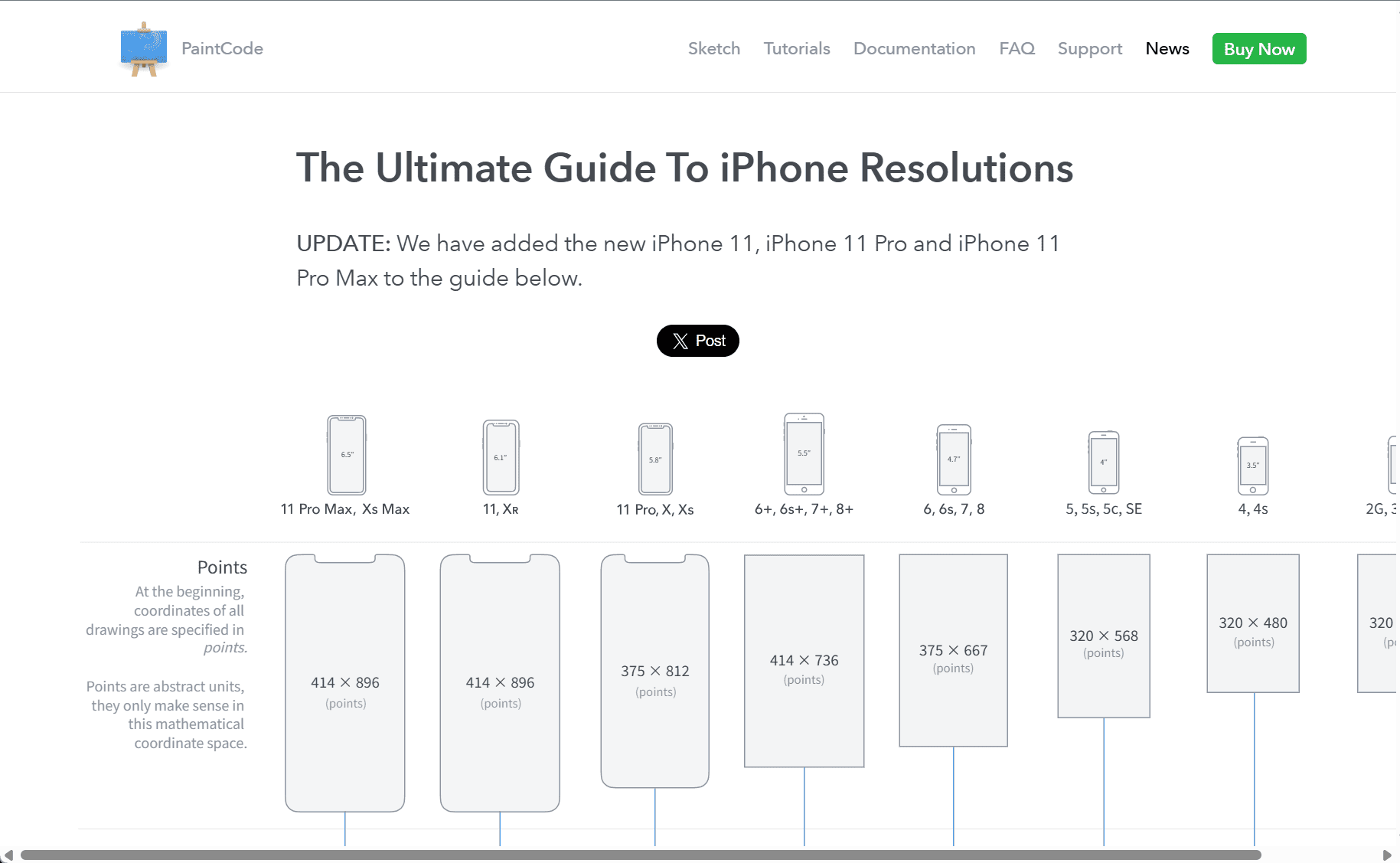
PaintCode: A Design Tool for Developers and Designers
PaintCode is a unique design tool aimed at simplifying the process of creating vector-based assets for developers and designers. It bridges the gap between design and code by offering a powerful suite of tools that allow users to design vector graphics directly in a way that seamlessly integrates with their codebase. Instead of manually exporting and coding assets, PaintCode automatically generates Objective-C, Swift, or even JavaScript code, making it a valuable tool for iOS, macOS, and web developers.
Key Features of PaintCode
-
Vector Drawing: PaintCode is designed to create vector-based graphics that scale smoothly across different screen sizes and resolutions. The ability to generate scalable assets is crucial for mobile apps and websites, ensuring that visuals remain crisp on all devices.
-
Code Generation: One of the standout features of PaintCode is its ability to convert drawings into native code. For iOS and macOS developers, it generates Objective-C or Swift code that can be directly used in Xcode projects. For web developers, it provides CSS and JavaScript code to create animations and designs that can be integrated into websites or web applications.
-
Interactive Previews: PaintCode includes interactive previews, allowing you to see real-time updates as you modify the vector graphics. This ensures that any adjustments made to the design are instantly reflected in the generated code, making the process more efficient.
-
Auto Layout Integration: Developers working with iOS and macOS can benefit from PaintCode’s auto layout integration. This feature allows users to design interfaces that adapt to different screen sizes and orientations, streamlining the process of creating responsive apps.
-
Animation Support: PaintCode also allows users to create animations directly within the app. By creating vector paths, users can animate elements in a way that is both flexible and lightweight, contributing to a smoother user experience in mobile applications.
-
Cross-Platform Support: PaintCode is designed to work seamlessly with multiple platforms. Whether you’re working on macOS for iOS apps or need to develop assets for web projects, PaintCode offers the necessary tools to support both iOS and web developers.
Benefits for Developers and Designers
1. Efficiency: PaintCode reduces the time spent manually coding vector graphics and animations. By automating the code generation process, it enables developers to focus more on app logic and less on visual asset creation.
2. Seamless Integration: Designers no longer have to worry about exporting files in various formats. PaintCode creates assets that are ready to be used directly within the app’s codebase, whether it’s for iOS, macOS, or web projects.
3. Maintainable Code: Since PaintCode generates high-quality, native code, developers can ensure that the assets remain easy to maintain and update over time. This eliminates the need to revisit and manually adjust code as the app evolves.
4. Design Flexibility: With the ability to adjust the code directly within PaintCode, designers can experiment with different visual assets without worrying about creating multiple versions or adjusting formats manually. It encourages creative freedom while maintaining a clean, organized codebase.
5. Cost-Effective Solution: PaintCode streamlines the design-to-development process, reducing the need for expensive outsourcing or relying on multiple tools to create visual assets. It’s an all-in-one solution for designers and developers working on iOS and web projects.
Who Should Use PaintCode?
PaintCode is an ideal tool for anyone who is involved in the development of mobile applications or websites that rely heavily on custom vector graphics and animations. Specifically, it benefits:
-
iOS and macOS developers: By directly generating Swift or Objective-C code, PaintCode simplifies the process of integrating vector graphics into your app.
-
Web developers: With support for JavaScript and CSS, it allows web developers to easily create complex vector-based animations and assets.
-
UI/UX Designers: Those designing user interfaces for apps and websites can save time by directly converting their designs into code, maintaining consistency and quality throughout the development process.
Conclusion
PaintCode stands out as a tool that merges design and development in a way that few other applications can. By automating the creation of vector graphics and converting them into native code, PaintCode eliminates the need for manual asset management and provides a more efficient workflow for both designers and developers. Whether you’re working on a mobile app or a web project, PaintCode offers the tools necessary to streamline your process and deliver high-quality visual assets that scale seamlessly across platforms.
With its powerful features, PaintCode continues to be a valuable asset for developers and designers seeking to optimize their workflows, making the process of creating sophisticated vector-based designs easier than ever.
data statistics
Relevant Navigation


